

Why Track Defended Attacks?
Understanding what attacks are being blocked is just as important as finding vulnerabilities:Validate Defenses
Confirm your WAF, rate limiting, and other protections are working as expected
Threat Intelligence
Understand what attackers are targeting and how
Security Posture
Demonstrate defense effectiveness to stakeholders
Gap Analysis
Identify attack patterns that might bypass current controls
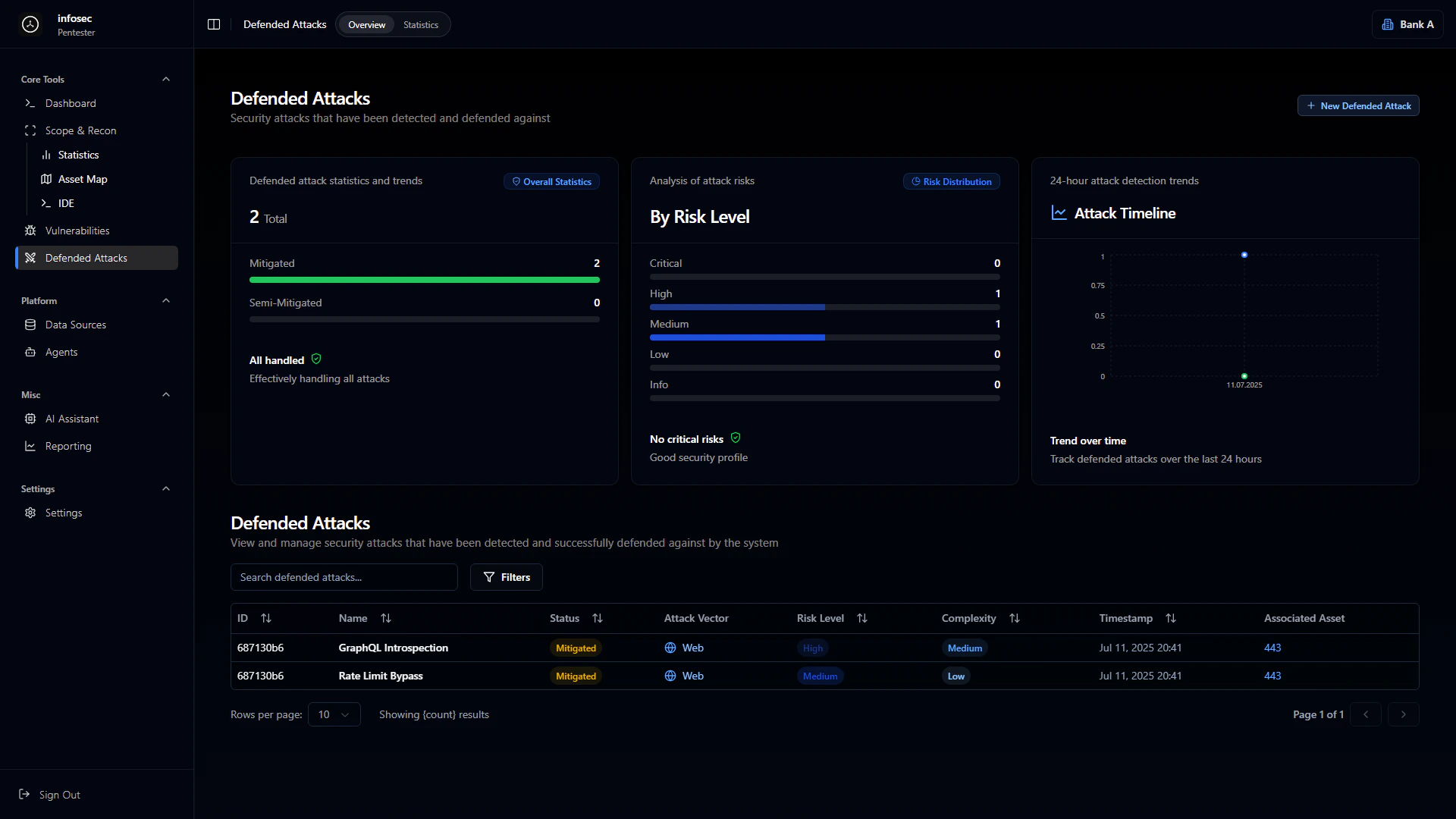
Overview Dashboard
Defense Statistics
The overview provides aggregate metrics on your defense effectiveness:Risk Level Distribution
Blocked attacks are categorized by the risk they would have posed:Critical
Highest severity attacks blocked
High
Significant threats stopped
Medium
Moderate risk attacks
Low
Minor attack attempts
Info
Informational detections
Security Profile Assessment
The platform provides an overall security assessment based on defended attacks:- “No critical risks” - No critical-level attacks detected
- “Good security profile” - Defenses are performing well
- “Attention needed” - Review defense configuration
Attack Timeline
24-Hour View
The attack timeline shows detection and response events over the last 24 hours:- Temporal scale displaying attack distribution
- Event frequency on the Y-axis (0-1.0 scale)
- Timestamp markers for each detection event
Trend Analytics
Track defense effectiveness patterns over time:- Attack frequency trends across days/weeks
- Defense response times for detection to mitigation
- Pattern identification for recurring attack types
- Seasonal or cyclical attack patterns
Defended Attacks Table
Table Columns
Common Attack Types
GraphQL Introspection
GraphQL Introspection
Vector: Web
Risk: High
Complexity: MediumAttempts to query the GraphQL schema to discover available queries, mutations, and types. Blocked to prevent API reconnaissance.
Rate Limit Bypass
Rate Limit Bypass
Vector: Web
Risk: Medium
Complexity: LowAttempts to circumvent rate limiting through header manipulation, IP rotation, or request timing. Defense mechanisms detected and blocked the bypass attempt.
SQL Injection Attempts
SQL Injection Attempts
Vector: Web
Risk: Critical
Complexity: VariableMalicious SQL queries blocked by WAF or input validation. Includes union-based, blind, and time-based injection attempts.
Authentication Attacks
Authentication Attacks
Vector: Web
Risk: High
Complexity: Low to MediumBrute force attempts, credential stuffing, and session manipulation blocked by authentication controls.
Attack Detail View
Clicking on a defended attack shows comprehensive information:Attack Information
- Attack signature or pattern that was detected
- Source information (IP, user agent, etc. if available)
- Target endpoint or service
- Payload details (sanitized)
Defense Response
- Detection mechanism that caught the attack (WAF, rate limiter, etc.)
- Response action taken (blocked, rate limited, challenged)
- Response time from detection to mitigation
Related Context
- Similar attacks in the same time period
- Linked vulnerabilities if the attack targets a known issue
- Asset information for the targeted service
Defense Mechanisms
The platform tracks which defense mechanisms are blocking attacks:Web Application Firewall (WAF)
WAF Protection
Blocks common attack patterns including:
- SQL Injection
- Cross-Site Scripting (XSS)
- Path Traversal
- Remote Code Execution attempts
- Protocol violations
Rate Limiting
Rate Limiting
Prevents abuse through:
- Request frequency limits
- Endpoint-specific thresholds
- IP-based restrictions
- User session limits
Authentication Controls
Auth Protection
Secures access through:
- Failed login lockouts
- MFA challenges
- Session validation
- Token verification
Statistics & Analytics
Attack Patterns
Analyze defended attacks to understand threat landscape:1
Frequency Analysis
How often are attacks occurring? Are there spikes?
2
Vector Analysis
Which attack vectors are most common?
3
Target Analysis
Which assets or endpoints are targeted most?
4
Source Analysis
Are attacks from specific sources or distributed?
Defense Effectiveness Metrics
Integration with Other Modules
Vulnerability Correlation
When an attack targets a known vulnerability:- Link to the vulnerability record
- Prioritize remediation for actively exploited issues
- Track if exploitation attempts increase
Reporting
Defended attacks feed into security reports:- Executive summaries include defense effectiveness metrics
- Technical reports detail specific attack attempts
- Trend reports show attack patterns over time
AI Assistant
Use the AI Assistant to analyze defended attacks:- “What attack patterns are most common this week?”
- “Are there any attacks that partially succeeded?”
- “Which assets are being targeted most frequently?”
Best Practices
Regular ReviewReview defended attacks weekly to:
- Confirm defenses are working
- Identify new attack patterns
- Tune WAF rules if needed
- Update threat models