> ## Documentation Index
> Fetch the complete documentation index at: https://docs-cerberus.c7-security.com/llms.txt
> Use this file to discover all available pages before exploring further.
# Defended Attacks
> Track, analyze, and report on security threats that were successfully detected and mitigated by your defenses.
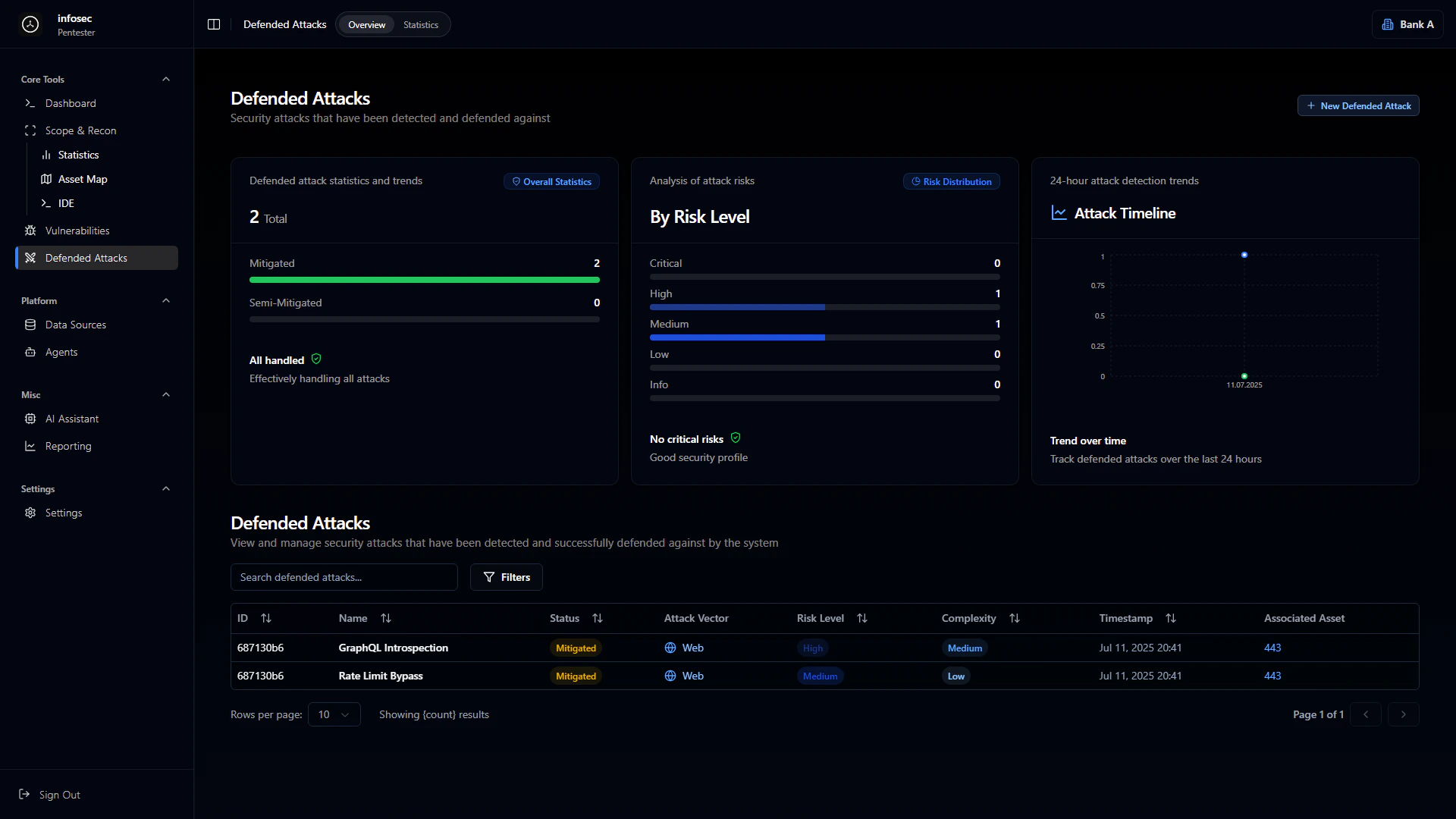 The Defended Attacks module tracks security threats that were successfully detected and blocked by your defense mechanisms. This provides visibility into what protections are working and helps validate your security investments.
## Why Track Defended Attacks?
Understanding what attacks are being blocked is just as important as finding vulnerabilities:
Confirm your WAF, rate limiting, and other protections are working as expected
Understand what attackers are targeting and how
Demonstrate defense effectiveness to stakeholders
Identify attack patterns that might bypass current controls
## Overview Dashboard
### Defense Statistics
The overview provides aggregate metrics on your defense effectiveness:
| Metric | Description |
| ----------------------- | ----------------------------------------------- |
| **Total Defended** | Count of all blocked attacks |
| **Fully Mitigated** | Attacks completely stopped |
| **Partially Mitigated** | Attacks that were limited but not fully blocked |
| **All Handled** | Confirmation when all attacks are processed |
### Risk Level Distribution
Blocked attacks are categorized by the risk they would have posed:
Highest severity attacks blocked
Significant threats stopped
Moderate risk attacks
Minor attack attempts
Informational detections
### Security Profile Assessment
The platform provides an overall security assessment based on defended attacks:
* **"No critical risks"** - No critical-level attacks detected
* **"Good security profile"** - Defenses are performing well
* **"Attention needed"** - Review defense configuration
## Attack Timeline
### 24-Hour View
The attack timeline shows detection and response events over the last 24 hours:
* **Temporal scale** displaying attack distribution
* **Event frequency** on the Y-axis (0-1.0 scale)
* **Timestamp markers** for each detection event
### Trend Analytics
Track defense effectiveness patterns over time:
* **Attack frequency trends** across days/weeks
* **Defense response times** for detection to mitigation
* **Pattern identification** for recurring attack types
* **Seasonal or cyclical** attack patterns
## Defended Attacks Table
### Table Columns
| Column | Description |
| ----------------- | --------------------------------------------- |
| **ID** | Unique attack identifier |
| **Name** | Attack type or title |
| **Status** | Defense status (Mitigated, Blocked, Detected) |
| **Attack Vector** | Type of attack (Web, Network, etc.) |
| **Risk Level** | Severity if attack had succeeded |
| **Complexity** | Attack sophistication level |
| **Timestamp** | When the attack was detected |
| **Related Asset** | Target asset or service |
### Common Attack Types
**Vector**: Web
**Risk**: High
**Complexity**: Medium
Attempts to query the GraphQL schema to discover available queries, mutations, and types. Blocked to prevent API reconnaissance.
**Vector**: Web
**Risk**: Medium
**Complexity**: Low
Attempts to circumvent rate limiting through header manipulation, IP rotation, or request timing. Defense mechanisms detected and blocked the bypass attempt.
**Vector**: Web
**Risk**: Critical
**Complexity**: Variable
Malicious SQL queries blocked by WAF or input validation. Includes union-based, blind, and time-based injection attempts.
**Vector**: Web
**Risk**: High
**Complexity**: Low to Medium
Brute force attempts, credential stuffing, and session manipulation blocked by authentication controls.
## Attack Detail View
Clicking on a defended attack shows comprehensive information:
### Attack Information
* **Attack signature** or pattern that was detected
* **Source information** (IP, user agent, etc. if available)
* **Target endpoint** or service
* **Payload details** (sanitized)
### Defense Response
* **Detection mechanism** that caught the attack (WAF, rate limiter, etc.)
* **Response action** taken (blocked, rate limited, challenged)
* **Response time** from detection to mitigation
### Related Context
* **Similar attacks** in the same time period
* **Linked vulnerabilities** if the attack targets a known issue
* **Asset information** for the targeted service
## Defense Mechanisms
The platform tracks which defense mechanisms are blocking attacks:
### Web Application Firewall (WAF)
Blocks common attack patterns including:
* SQL Injection
* Cross-Site Scripting (XSS)
* Path Traversal
* Remote Code Execution attempts
* Protocol violations
### Rate Limiting
Prevents abuse through:
* Request frequency limits
* Endpoint-specific thresholds
* IP-based restrictions
* User session limits
### Authentication Controls
Secures access through:
* Failed login lockouts
* MFA challenges
* Session validation
* Token verification
## Statistics & Analytics
### Attack Patterns
Analyze defended attacks to understand threat landscape:
How often are attacks occurring? Are there spikes?
Which attack vectors are most common?
Which assets or endpoints are targeted most?
Are attacks from specific sources or distributed?
### Defense Effectiveness Metrics
| Metric | Description |
| ----------------------- | ------------------------------------------ |
| **Block Rate** | Percentage of attacks successfully blocked |
| **Detection Time** | Average time to detect an attack |
| **Response Time** | Average time from detection to mitigation |
| **False Positive Rate** | Legitimate traffic incorrectly blocked |
## Integration with Other Modules
### Vulnerability Correlation
When an attack targets a known vulnerability:
* Link to the vulnerability record
* Prioritize remediation for actively exploited issues
* Track if exploitation attempts increase
### Reporting
Defended attacks feed into security reports:
* **Executive summaries** include defense effectiveness metrics
* **Technical reports** detail specific attack attempts
* **Trend reports** show attack patterns over time
### AI Assistant
Use the AI Assistant to analyze defended attacks:
* "What attack patterns are most common this week?"
* "Are there any attacks that partially succeeded?"
* "Which assets are being targeted most frequently?"
## Best Practices
**Regular Review**
Review defended attacks weekly to:
1. Confirm defenses are working
2. Identify new attack patterns
3. Tune WAF rules if needed
4. Update threat models
**Partial Mitigations**
Attacks marked as "Partially Mitigated" need immediate attention. These indicate the defense limited but didn't fully stop the attack - review and strengthen controls.
**Use for Red Team Validation**
During red team exercises, track which attacks are caught by defenses. This validates both offensive techniques and defensive coverage.
The Defended Attacks module tracks security threats that were successfully detected and blocked by your defense mechanisms. This provides visibility into what protections are working and helps validate your security investments.
## Why Track Defended Attacks?
Understanding what attacks are being blocked is just as important as finding vulnerabilities:
Confirm your WAF, rate limiting, and other protections are working as expected
Understand what attackers are targeting and how
Demonstrate defense effectiveness to stakeholders
Identify attack patterns that might bypass current controls
## Overview Dashboard
### Defense Statistics
The overview provides aggregate metrics on your defense effectiveness:
| Metric | Description |
| ----------------------- | ----------------------------------------------- |
| **Total Defended** | Count of all blocked attacks |
| **Fully Mitigated** | Attacks completely stopped |
| **Partially Mitigated** | Attacks that were limited but not fully blocked |
| **All Handled** | Confirmation when all attacks are processed |
### Risk Level Distribution
Blocked attacks are categorized by the risk they would have posed:
Highest severity attacks blocked
Significant threats stopped
Moderate risk attacks
Minor attack attempts
Informational detections
### Security Profile Assessment
The platform provides an overall security assessment based on defended attacks:
* **"No critical risks"** - No critical-level attacks detected
* **"Good security profile"** - Defenses are performing well
* **"Attention needed"** - Review defense configuration
## Attack Timeline
### 24-Hour View
The attack timeline shows detection and response events over the last 24 hours:
* **Temporal scale** displaying attack distribution
* **Event frequency** on the Y-axis (0-1.0 scale)
* **Timestamp markers** for each detection event
### Trend Analytics
Track defense effectiveness patterns over time:
* **Attack frequency trends** across days/weeks
* **Defense response times** for detection to mitigation
* **Pattern identification** for recurring attack types
* **Seasonal or cyclical** attack patterns
## Defended Attacks Table
### Table Columns
| Column | Description |
| ----------------- | --------------------------------------------- |
| **ID** | Unique attack identifier |
| **Name** | Attack type or title |
| **Status** | Defense status (Mitigated, Blocked, Detected) |
| **Attack Vector** | Type of attack (Web, Network, etc.) |
| **Risk Level** | Severity if attack had succeeded |
| **Complexity** | Attack sophistication level |
| **Timestamp** | When the attack was detected |
| **Related Asset** | Target asset or service |
### Common Attack Types
**Vector**: Web
**Risk**: High
**Complexity**: Medium
Attempts to query the GraphQL schema to discover available queries, mutations, and types. Blocked to prevent API reconnaissance.
**Vector**: Web
**Risk**: Medium
**Complexity**: Low
Attempts to circumvent rate limiting through header manipulation, IP rotation, or request timing. Defense mechanisms detected and blocked the bypass attempt.
**Vector**: Web
**Risk**: Critical
**Complexity**: Variable
Malicious SQL queries blocked by WAF or input validation. Includes union-based, blind, and time-based injection attempts.
**Vector**: Web
**Risk**: High
**Complexity**: Low to Medium
Brute force attempts, credential stuffing, and session manipulation blocked by authentication controls.
## Attack Detail View
Clicking on a defended attack shows comprehensive information:
### Attack Information
* **Attack signature** or pattern that was detected
* **Source information** (IP, user agent, etc. if available)
* **Target endpoint** or service
* **Payload details** (sanitized)
### Defense Response
* **Detection mechanism** that caught the attack (WAF, rate limiter, etc.)
* **Response action** taken (blocked, rate limited, challenged)
* **Response time** from detection to mitigation
### Related Context
* **Similar attacks** in the same time period
* **Linked vulnerabilities** if the attack targets a known issue
* **Asset information** for the targeted service
## Defense Mechanisms
The platform tracks which defense mechanisms are blocking attacks:
### Web Application Firewall (WAF)
Blocks common attack patterns including:
* SQL Injection
* Cross-Site Scripting (XSS)
* Path Traversal
* Remote Code Execution attempts
* Protocol violations
### Rate Limiting
Prevents abuse through:
* Request frequency limits
* Endpoint-specific thresholds
* IP-based restrictions
* User session limits
### Authentication Controls
Secures access through:
* Failed login lockouts
* MFA challenges
* Session validation
* Token verification
## Statistics & Analytics
### Attack Patterns
Analyze defended attacks to understand threat landscape:
How often are attacks occurring? Are there spikes?
Which attack vectors are most common?
Which assets or endpoints are targeted most?
Are attacks from specific sources or distributed?
### Defense Effectiveness Metrics
| Metric | Description |
| ----------------------- | ------------------------------------------ |
| **Block Rate** | Percentage of attacks successfully blocked |
| **Detection Time** | Average time to detect an attack |
| **Response Time** | Average time from detection to mitigation |
| **False Positive Rate** | Legitimate traffic incorrectly blocked |
## Integration with Other Modules
### Vulnerability Correlation
When an attack targets a known vulnerability:
* Link to the vulnerability record
* Prioritize remediation for actively exploited issues
* Track if exploitation attempts increase
### Reporting
Defended attacks feed into security reports:
* **Executive summaries** include defense effectiveness metrics
* **Technical reports** detail specific attack attempts
* **Trend reports** show attack patterns over time
### AI Assistant
Use the AI Assistant to analyze defended attacks:
* "What attack patterns are most common this week?"
* "Are there any attacks that partially succeeded?"
* "Which assets are being targeted most frequently?"
## Best Practices
**Regular Review**
Review defended attacks weekly to:
1. Confirm defenses are working
2. Identify new attack patterns
3. Tune WAF rules if needed
4. Update threat models
**Partial Mitigations**
Attacks marked as "Partially Mitigated" need immediate attention. These indicate the defense limited but didn't fully stop the attack - review and strengthen controls.
**Use for Red Team Validation**
During red team exercises, track which attacks are caught by defenses. This validates both offensive techniques and defensive coverage.